
Delete Google Photos in bulk directly from your browser with Start/Stop controls, Dry Run safety mode, and optional auto zoom-out to process more items per screen.
Download Extension
Install the extension from the official stores or download the .zip file for manual installation in Chrome.
Also works in Edge, Opera, Vivaldi, and Yandex Browser via Chrome Web Store .
Download .zip for Chrome
What This Extension Does
Delete All Google Photos - Bulk Tool helps you remove large numbers of photos from your own Google Photos library on photos.google.com.
Key Features
- Bulk deletion workflow for Google Photos
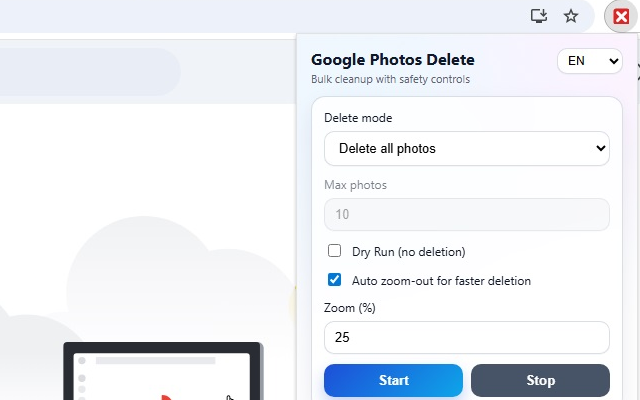
- Start / Stop controls from a simple popup UI
- Dry Run mode to test selection behavior without clicking delete or confirm
- Max photos limit to cap each run
- Auto zoom-out option to fit more photos on screen and speed up processing
- Multilingual button detection (EN/JA/DE/FR/ES/IT/PT/NL/KO keywords)
How to Use
- Open https://photos.google.com/ in the active tab.
- Open the extension popup.
- (Recommended) Enable Dry Run and click Start.
- Verify that photo selection behaves as expected.
- Disable Dry Run and run deletion.
- Use Stop at any time.
Important Notice
- This extension is user-controlled and acts only when you click Start.
- UI selectors in Google Photos may change over time; behavior can be affected by Google interface updates.
- Deletions are performed in Google Photos (typically moving items to Trash according to Google Photos behavior).
Privacy Policy
Effective date: March 8, 2026
Delete All Google Photos - Bulk Tool (the Extension) respects your privacy.
1. Data We Collect
The Extension does not collect, store, or transmit personal data to our servers.
2. How the Extension Works
The Extension runs locally in your browser and interacts only with https://photos.google.com/* to automate user-initiated bulk deletion actions.
3. Permissions Used
- storage: saves user preferences (for example max photos, dry run, zoom settings).
- tabs: communicates with the active tab when the user starts or stops the process.
- host permission (https://photos.google.com/*): limits operation to Google Photos pages.
4. Data Sharing
We do not sell, rent, or share user data with third parties. We do not use advertising trackers or analytics in the extension.
5. Data Retention
Settings are stored in Chrome extension storage (chrome.storage.sync) tied to your browser profile/account. You may remove this data by uninstalling the extension or clearing extension storage.
6. Security
Because processing happens locally in the browser and no backend data pipeline is used, exposure of user data is minimized.
7. Children's Privacy
The extension is not intended for children under 13 and does not knowingly collect personal information from children.
8. Changes to This Policy
This policy may be updated from time to time. Any updates will appear on this page with a revised effective date.
Screenshots
Contact / Support
For privacy questions, support, or bug reports:
Email: [email protected]
FAQ
Can I test before deleting photos?
Yes. Enable Dry Run mode first to verify selection behavior without triggering delete and confirm actions.
Can I stop the process at any moment?
Yes. The Stop control is available from the extension popup during operation.